Unlocking the Potential of Sunflower 3D Mandala Layered Flower Designs
If you have ever stared at a flat digital image and wondered how to transform it into a stunning, multi-dimensional craft project, you are not alone. The Sunflower 3D Mandala Layered Flower is more than just a pretty graphic; it is a gateway to creating professional-grade art without needing advanced design skills. Whether you are a hobbyist looking to decorate your home or a small business owner expanding your product line, understanding the nuances of this layered design is crucial for success. However, simply downloading a file does not guarantee a perfect result. Many creators stumble over common pitfalls that turn a promising project into a frustrating experience.
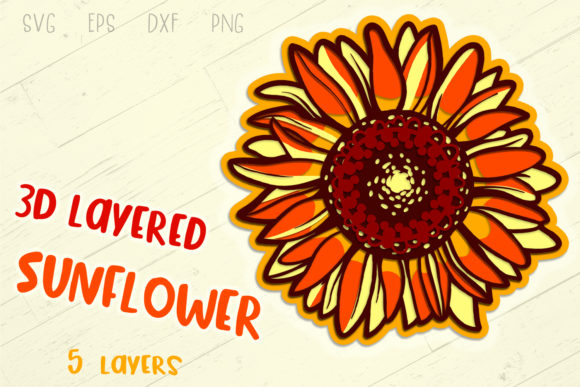
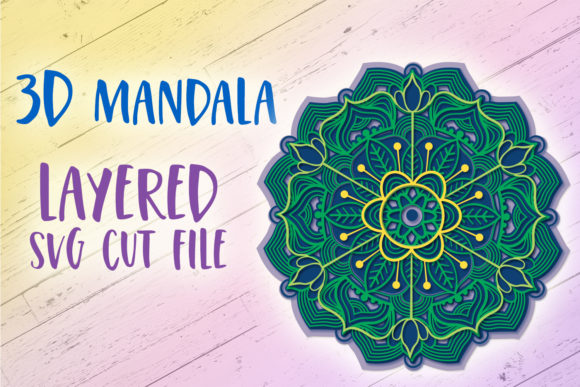
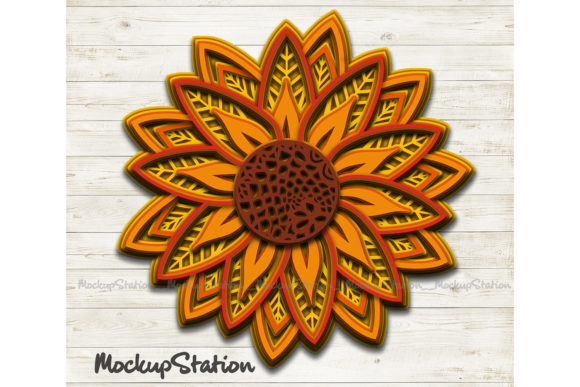
The core appeal of the Sunflower 3D Mandala Layered Flower lies in its complexity and versatility. Unlike simple single-layer cut files, this design consists of seven distinct layers that work together to create depth and texture. This layering technique mimics the natural structure of a sunflower while adding an artistic mandala twist, making it ideal for wall art, greeting cards, scrapbooking, and even apparel decoration. When executed correctly, the final product looks like a handcrafted masterpiece rather than a mass-produced sticker.
Navigating File Formats: Beyond the ZIP Download
One of the most frequent misunderstandings among buyers involves the specific file formats included in the download package. You will receive a single ZIP file containing SVG, EPS, PNG, and DXF formats, each serving a unique purpose. A common mistake is assuming that one format works for every machine. If you own a Cricut, you primarily need the SVG file for Design Space, but relying on a PNG for cutting can lead to jagged edges or failed cuts because raster images do not define cut lines as precisely as vector files.
Similarly, Silhouette Studio users often confuse their software versions. The Designer Edition handles complex layers differently than the free version. If you attempt to import a multi-layered SVG into the free version of Silhouette Studio, you might find that the layers merge incorrectly or that certain elements are locked, preventing you from separating them for individual coloring. Always verify which edition of the software you are using before attempting to open the provided files. Ignoring these technical details can waste hours of troubleshooting time that could be spent creating.
The Critical Importance of Layer Order
When working with a seven-layer design, the sequence in which you arrange the pieces is paramount. In a physical assembly, the smallest center piece usually sits on top of the larger petals, which sit on top of the outermost mandala rings. If you reverse this order during the cutting phase or when arranging your materials, the final 3D effect collapses. Instead of a blooming flower, you end up with a flat, disjointed mess where the structural integrity of the design is lost.
To avoid this, always inspect the layers within your design software before sending anything to the cutter. Check the layer stack to ensure the largest base element is at the bottom and the smallest detail is at the top. Many creators skip this step, assuming the file comes pre-ordered perfectly. While the source file is likely organized correctly, importing it into different software environments can sometimes scramble the hierarchy. Taking two minutes to reorder your layers manually ensures that your subsequent steps proceed smoothly.
Material Selection and Cutting Efficiency
Even with the perfect file setup, the choice of material can make or break your project. Sunflower designs often feature intricate details, particularly in the mandala sections. Using thick cardstock or heavy vinyl without adjusting your blade settings can cause "bridging," where tiny connecting parts of the design remain attached to the main sheet, ruining the delicate shape. Conversely, using thin paper for a project meant to stand upright can result in a flimsy final product that loses its 3D shape.
Another overlooked detail is the color palette. Since the design relies on layering to create dimension, using colors that are too similar can flatten the visual impact. For instance, if you use light yellow for both the inner petals and the outer ring, the separation between layers disappears. To achieve the true "3D" look intended by the Sunflower 3D Mandala Layered Flower template, select shades that offer contrast yet harmonize well. Think of using deep oranges for the center, transitioning to bright yellows, and finishing with earthy greens or contrasting accents for the mandala background.
Digital vs. Physical Application
It is also important to distinguish between how you use the PNG versus the vector files. The PNG provided in the ZIP is a high-resolution clip art suitable for printing on photo paper or iron-on transfers. It does not contain cut lines. If you try to cut directly from a PNG in your cutting machine software, you must trace over the image first, which is prone to error and often results in misaligned cuts. Always use the SVG or DXF for cutting machines and reserve the PNG for direct printing or digital graphics projects.
For entrepreneurs selling handmade goods, this distinction affects your production workflow. Relying on traced PNGs increases the risk of defects and customer returns. By utilizing the native vector files (SVG/EPS/DXF), you ensure consistent, clean cuts every time, saving money on wasted materials and protecting your reputation for quality.
Evaluating Your Purchase Before You Cut
Before diving into your next project, take a moment to evaluate what you are actually receiving. Some sellers provide watermarked previews that look significantly different from the actual deliverable. While this preview helps you visualize the concept, it should never be used for production. The promise of "no watermarks or logos" in the final download is standard, but verifying this immediately after unzipping your folder is a good habit. Ensure all seven layers are present and visible.
Furthermore, check the scale of the design. A mandala flower can range from a small embellishment to a large wall decor piece. Without knowing the dimensions of the layers relative to each other, you might cut a design that is too small for your intended surface area. Most design software allows you to set a reference size (e.g., 8x8 inches). Set this parameter early to see exactly how the layers fit together and whether they meet your spatial requirements.
Making the Right Choice for Your Workflow
The decision to purchase a layered design like the Sunflower 3D Mandala Layered Flower should be driven by your specific needs and the tools you have available. If you are new to crafting, the availability of multiple formats (SVG, EPS, DXF, PNG) makes this a versatile asset that grows with your skill level. Beginners can start with simple paper crafts using the printed PNG, while advanced users can utilize the vector files for complex vinyl decals or laser cutting projects.
By avoiding common mistakes such as ignoring layer order, mismatching file formats with machines, and selecting inappropriate materials, you ensure that your creative vision translates accurately into reality. The difference between a disappointing project and a cherished creation often comes down to these preparatory steps. Take the time to understand the file structure, respect the intricacies of the seven-layer design, and choose your materials wisely. With the right approach, this digital template becomes a powerful tool that elevates your work from amateur to artisanal.